
Learn about how to mitigate the risk of duplicate payments
Crezco includes built-in protection against duplicate payments in 2 key ways:
- Duplicate detection using the partnerEntityId. This is triggered:
- When a pay run is created
- When a pay run is checked out
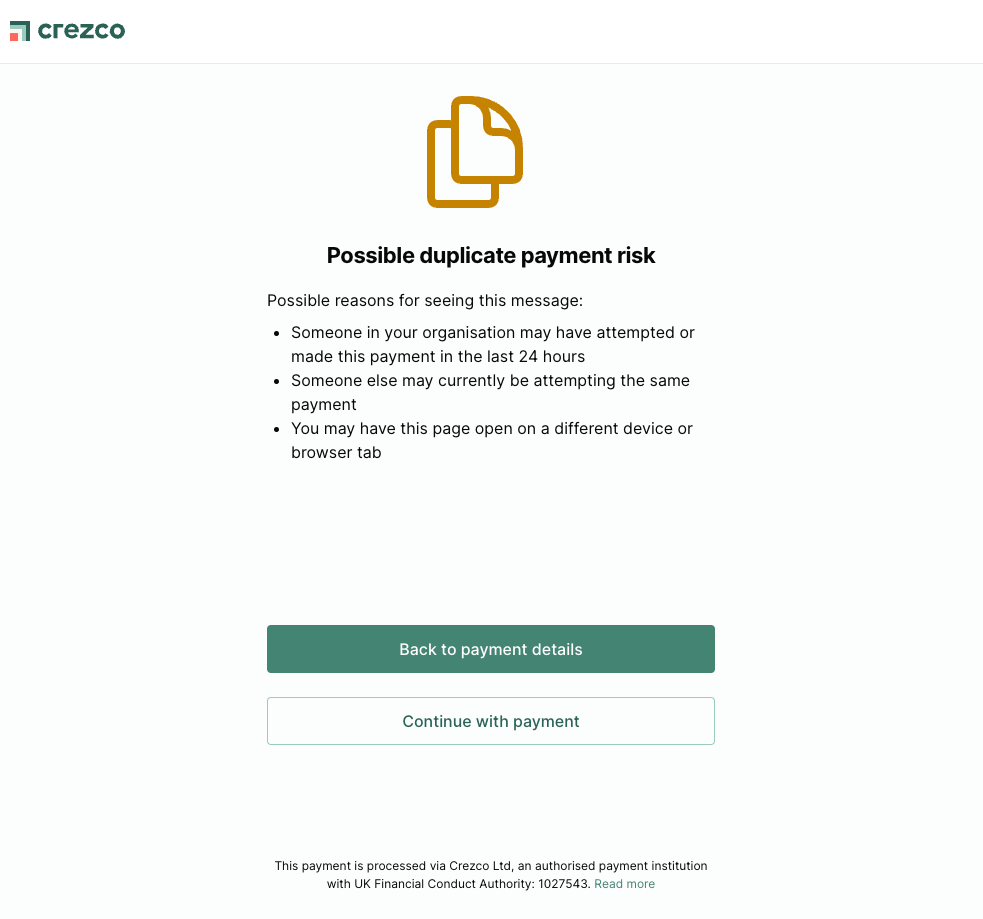
- Duplicate detection warning during the payment flow
This guide explains how each check works and what your integration needs to do to ensure duplicates are caught reliably.
Duplicate detection using partnerEntityId
partnerEntityIdAbout partnerEntityIds
partnerEntityIdsTo protect from potential duplicate payments Crezco requires our partners to submit a partnerEntityId at both the pay run and payable levels. The partnerEntityId should have a 1:1 relationship with an item that needs paying in your system. We will then use this to make sure the same item can never be paid twice.
Duplicate partnerEntityId checks
partnerEntityId checksWhen you create a pay run, both the pay run and its constituent payables are in draft mode. In this state, partnerEntityId values can be freely re-used across pay runs and payables, as a draft pay run may be discarded and recreated to correct issues before payment is initiated.
Once the Checkout endpoint is called for a pay run, it leaves draft mode. At this point:
- The pay run's
partnerEntityIdis permanently locked and cannot be re-used for any future pay run - Each payable's
partnerEntityIdcannot be re-used in a different pay run unless the payable is in a terminal failure state (CancelledorReversed)
This duplicate check runs at two points: when creating a pay run and when checking out a pay run. In both cases, if a payable's partnerEntityId is already in use on a payable that is not in a Draft, Cancelled, or Reversed state, the request is rejected with a 409 Conflict.
For example:
- You create Pay Run A and Pay Run B, each containing a payable with the same
partnerEntityId. Both are in Draft status, so this is permitted. - You check out Pay Run A. Its payable moves to
Openstatus. - You attempt to check out Pay Run B. The request is rejected with a 409 Conflict because a payable with the same
partnerEntityIdis already Open. - You attempt to create Pay Run C with the same payable
partnerEntityId. This is also rejected with a 409 Conflict for the same reason. - You cancel Pay Run A. Its payable moves to
Cancelledstatus. - You can now check out Pay Run B or create Pay Run C (not both), as the payable's
partnerEntityIdis no longer in use on an active payable.
If one or more duplicate partnerEntityId are present, the API returns a 409 Conflict with details of the conflicting IDs.
{
    "type": "https://api.crezco.com/api/errors/conflict",
    "title": "Conflict",
    "status": 409,
    "detail": "One or more validation errors occurred.",
    "errors": {
        "PartnerEntityId": [
            "Duplicate PartnerEntityId found for pay-run-1"
        ],
        "Payables[0].PartnerEntityId": [
            "Duplicate PartnerEntityId found for payable-1 on pay run fff1d8ac-d5db-428c-9ae2-9f6d14eadbd2"
        ]
    }
}Note: This check returns a 409, not a 400. Treat this response as a signal that the pay run or payable has already been submitted and should not be resubmitted.
Re-using partnerEntityId for multiple payables
partnerEntityId for multiple payablesIn most cases, a partnerEntityId should only ever be paid once. However, there are legitimate scenarios where you may need to resubmit a payment for the same item, for example if a previous payment failed or was cancelled.
In these cases, re-using the partnerEntityId is permitted, provided the original payable has reached a terminal failure state. The following states allow re-use:
Draft(this is re-usable as the payable is still in draft - see above)CancelledReversed
If the original payable is in any other state, the request will be rejected with a 409 Conflict as described above.
Note: You should only re-use a
partnerEntityIdwhen you have confirmed via the API or a webhook that the original payable has reached one of these terminal states. Do not rely on a timeout or assume failure. Always verify the state explicitly before resubmitting.
Duplicate detection warning during the payment flow
Once checkout is initiated for a pay run, Crezco runs additional checks within the hosted payment flow.
If a payable in the pay run closely matches a recent payment, a warning is shown to the user before they authorise. The user can choose to proceed.
Conditions for this check to apply
The warning fires when all four of the following fields match a payable from a different pay run:
- Reference
- Beneficiary account (sort code and account number, or IBAN)
- Amount
- Funding currency
The match is only checked against non-failed payables within the past 24 hours, excluding fee-payables
All four fields must match (a shared reference alone is not sufficient). This check runs across all payment sources for the organisation. A bank payment and a card payment with identical payable details would both be caught.
Note: Even if two separate completely different pay runs are paid within this time period, but two of the individual payables match all of these rules, the duplicate payment screen will still appear.
Image of duplicate warning
Your responsibilities as a partner
The duplicate detection checks rely on your integration mapping each bill or payment to a stable, consistent partnerEntityId across submission attempts.
If your system generates a new partnerEntityId each time the same bill is submitted for payment, duplicate detection will not work correctly.
The recommended approach is to derive partnerEntityId from a stable identifier in your system, such as the bill or invoice ID, and reuse it consistently across any retries or resubmissions.
Some examples:
Accounting software
- In your accounting software, the partnerEntityId could be the bill to be paid e.g. a payable
partnerEntityIdofINV-001 - Alternatively it could be the part of the bill to be paid if you allow partial bill payments
- e.g. a payable partnerEntityId of
INV-001-part-1
- e.g. a payable partnerEntityId of
We recommend that each part payment is recorded in partner system with its own ID, and partner system has to ensure that only the part payments get sent to us
Payroll software
- In your payroll software,
partnerEntityIdcould be the the payslip id (e.g.jane-doe-april-2026-payslip)
Displaying payments as available to pay in your platform
When deciding whether to display a payment as available to pay in your platform, use the state of its corresponding Crezco payable to determine the correct behaviour.
Payable not yet created in Crezco
If no payable has been created yet, call POST .../pay-runs to create one in Draft state, then immediately call the POST .../Checkout endpoint and redirect the user to the returned URL.
Payable exists in Crezco
Use the following table to determine what to show:
| Payable state | Display as available to pay? | Action |
|---|---|---|
Draft | Yes | Call Checkout and redirect the user to the returned URL |
Open | Yes | Call Checkout and redirect the user to the returned URL |
UserInitiationInProgress | Yes | Call Checkout and redirect the user to the returned URL |
Cancelled | Yes | Create a new pay run with the same payable partnerEntityId, then call Checkout and redirect the user |
Reversed | Yes | Create a new pay run with the same payable partnerEntityId, then call Checkout and redirect the user |
AwaitingMultiAuth | No | Disable the pay button / Do not display the payable as available to pay |
BankInitiating | No | Disable the pay button / Do not display the payable as available to pay |
TransfersInProgress | No | Disable the pay button / Do not display the payable as available to pay |
Processing | No | Disable the pay button / Do not display the payable as available to pay |
WaitingForCustomer | No | Disable the pay button / Do not display the payable as available to pay |
Cancelling | No | Disable the pay button / Do not display the payable as available to pay |
Reversing | No | Disable the pay button / Do not display the payable as available to pay |
Processed | No | The payment has completed successfully. Do not display as available to pay |
Note: Always re-call the Checkout endpoint when redirecting a user to the payment flow. Do not cache the URL returned from a previous Checkout call, as the state of the pay run may have changed and the URL may no longer be valid.