
Learn how to connect a test bank account or card
You can use Crezco's simulators to link fake bank accounts and cards to your organisation. You can then use these payment sources to make payments without moving real money.
Set up a Fake Bank Account
To connect a fake bank account, follow the steps outlined in the account connection guide. When selecting the bank, make sure to select the Crezco Sandbox - GB bank.
Instead of a real bank the app will redirect you to the simulator interface. Here you can select a preconfigured scenario to respond with. By default this is a successful bank connection. When choosing InstantlyCompleted it will then connect two new fake accounts. One will be a savings account and one will be a current account.
Set up a Fake Card
To connect a fake card, call Connect Card (or Connect and choose to add a card) and enter one of the test card numbers below in the hosted flow - see Executing a Simulated Card Payment for the full list. Use expiry 12/2030 and CVV 123 unless stated otherwise.
Executing a Simulated Payment
To make a simulated payment you need to use the id for a fake account when creating a pay run. The checkout flow will then redirect you to the simulator interface instead of a real bank.
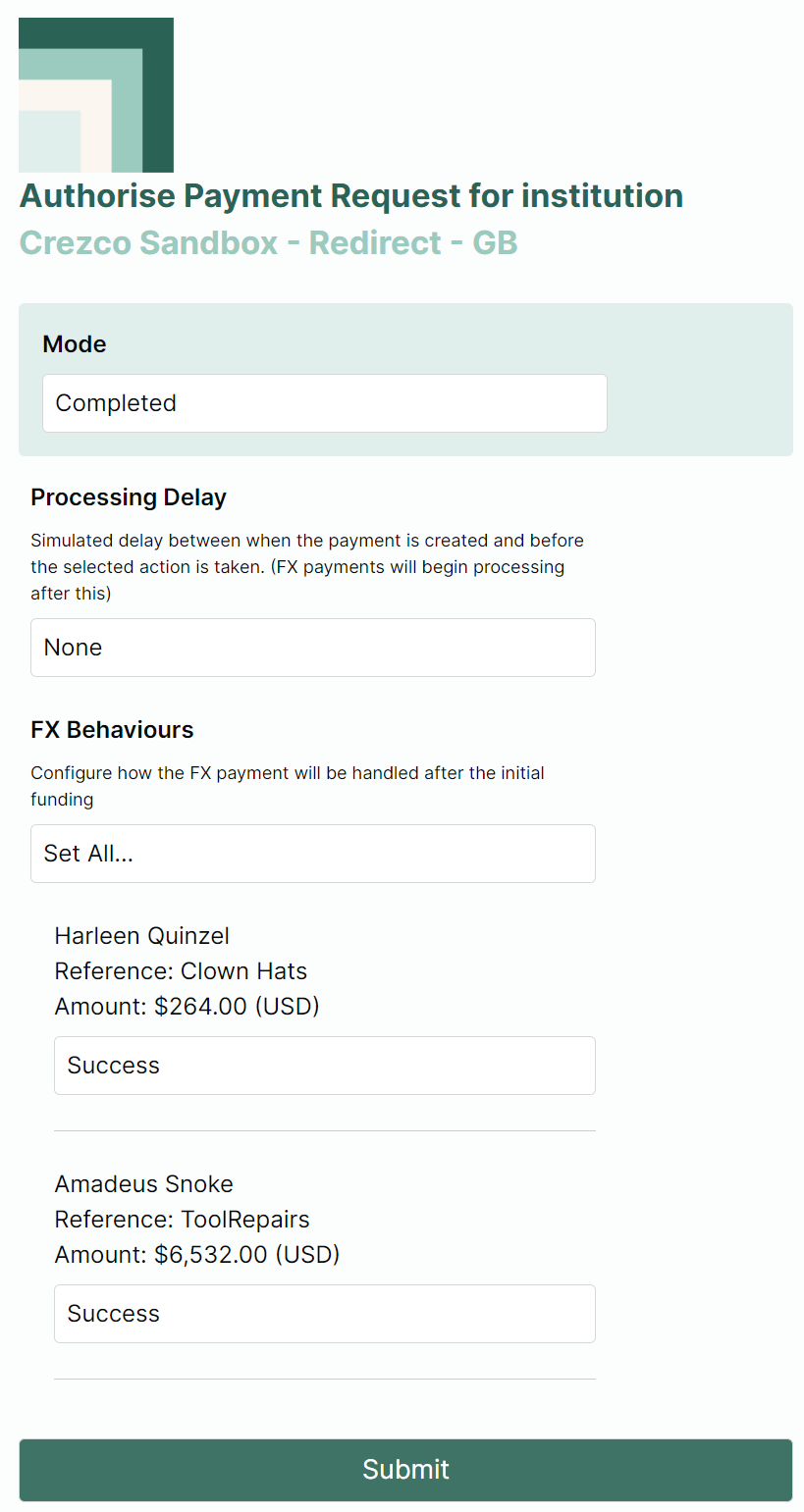
The simulator interface allows you to configure various payment results. By default it will configure a successful payment. Once you've finished setting configuration, click Submit to be redirected back as if returning from the users bank.
Modes
Completed - Simulates when funds are taken from the payers account.
Declined - Simulates when the payment is declined by the bank
Insufficient Funds - Simulates when there are not enough funds to facilitate the payment.
Redirect Error - Configured an erroneous response when returning from the bank to the payment flow.
Requires-Multi-auth - Simulates when a payment requires authorisation from multiple parties.
Stuck - This configures the payment to stay in a pending state and never complete.
User Cancelled - Simulates when the end-user cancels the payment authorisation.
Supplementary Behavioural Options
Processing Delay - Allows you to set up to a 30 second delay before the configured response is actioned. The payment will appear as pending until this point. Available for Completed, Declined and Stuck modes.
FX Behaviours - If your payment is (or in the case of bulk payments includes) cross currency payments, you can configure various FX related responses to each one such as conversion failures or payout failures/reversals. Available for Completed and Stuck modes.
Executing a Simulated Card Payment
To make a simulated card payment, set paymentSourceType to Card when creating a pay run and check out as normal - see the Pay by card guide. Instead of a real card processor, enter one of the test card numbers below at the hosted card entry page to trigger the corresponding outcome.
Unless noted otherwise, use expiry 12/2030 and CVV 123.
| Scenario | Card number | Notes |
|---|---|---|
| Processed - Simulates a successful card payment | 4242 4242 4242 4242 (Visa Credit), 5305 4847 4880 0098 (Mastercard Debit), 3726 8858 1899 681 (Amex) | If prompted for 3D Secure, enter Checkout1! to complete the challenge |
| Declined by issuer - Simulates the card issuer declining the payment | 4111 1111 1111 1129 (Visa) | User can retry with a different card or cancel |
| Card details incorrect - Simulates invalid card details being entered | 4485 3815 7718 2090 (Visa) | User can retry or cancel |
| Insufficient funds - Simulates the card not having enough available balance | 4544 2491 6767 3670 (Visa), 5437 8211 3539 9682 (Mastercard) | User can retry or cancel |
| Check card settings - Simulates a payment blocked by the cardholder's own card settings | 4152 8125 2183 3588 (Visa) | User can retry or cancel |
| Card not active - Simulates a card that hasn't been activated yet | 4532 8194 1348 7978 (Visa) | User can retry or cancel |
| Generic error (retryable) - Simulates a technical failure that can be retried | 4024 0071 0357 3027 (Visa), 5148 4474 6173 7269 (Mastercard) | User can retry or cancel |
| Generic error (non-retryable) - Simulates a technical failure that will never succeed with that card | 4941 2020 6099 9329 (Visa), 5363 4501 8040 2239 (Mastercard) | Use a different card to retry successfully |
Reusing a stored test cardIf you connect one of these test cards as a payment source first (see Set up a Fake Card), you can also reference it by
paymentSourceIdon a pay run instead of re-entering the card details at checkout - the same outcome will be simulated.